Can a Support Agent be associated with Multiple Departments?
Yes, support agents can be associated to multiple Departments.
Goto Setup >Admin Settings >Users >edit the Support Rep and associate departments to the Support rep.
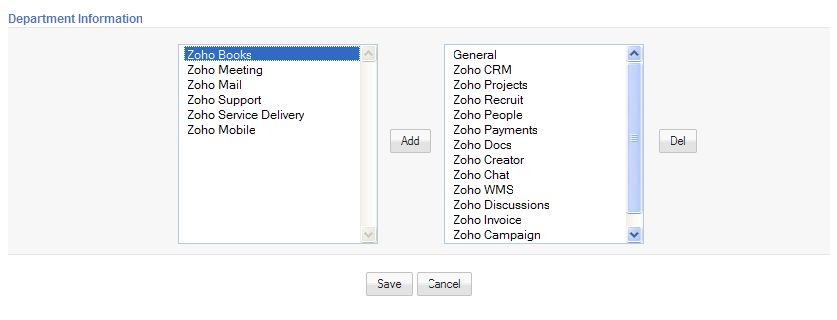
Goto Setup >Admin Settings >Users >edit the Support Rep and associate departments to the Support rep.
Related Articles
Can a Support Agent be associated with multiple Portals?
Yes, Support Agent can be associate to multiple Portals. As soon as the Support rep log-in, associated Portal URL's are listed. Support rep can click on a Portal to view/reply tickets.How can I hide fields to Support Agent?
To hide fields, Goto Setup >Admin Settings >Field level security >select the module > Profile Now, check/un-check the fields that would like to show to the Support Agent associated with that profile and save the settings. For more help refer, Field ...How can I add a Support Agent?
To add support agents, Goto Setup > Admin Settings > Support reps > Add Support Rep. Once you add a Support Rep, an invitation e-mail with the confirmation link would be sent to them. On confirmation, Support Rep is associated into your ...I'm not able to Deactivate Support Agent
If you are not able to de-activate a Support Agent, please check if the Support Agent is a primary contact. Goto Setup >Admin Settings >Company Details >Check if the Support Agent is a primary contact.My Support Agent did not receive invitation e-mail
If your Support Rep did not receive the invitation e-mail to join your organization, you can re-invite the Support Rep. Goto Setup > Admin Settings > Support Reps > Select a Support Agent > Click Re-Invite button. This triggers another invitation ...